
V Rising
Server Hosting in Australia
Starting from $6/mo. Configure your plan below.
Choose Your Plan
V Rising Game Type

V Rising
Build your castle, hunt bosses and play PvE or PvP with up to 40 players on PC. Your V Rising server stays online when you log off, and it's hosted in Sydney for low ping across AU and NZ.
Choose Your Plan
All prices are in Australian dollars (AUD).Select a plan to view price
Server Specs
- Performance-tuned processors
- Unlimited NVMe SSD storage
- Enterprise DDoS Protection
Network
- Premium Sydney bandwidth
- Low-latency routing
Game Server FeaturesWhat's included with my server?

Blazing Fast Servers

Full File Manager

Instant Setup

Automated Backups

Fast Support

DDoS Protection

Scale Up or Down

72 Hour Refunds
Our Control PanelMeet CorePanel
Discover powerful features to manage your game server!
Dashboard
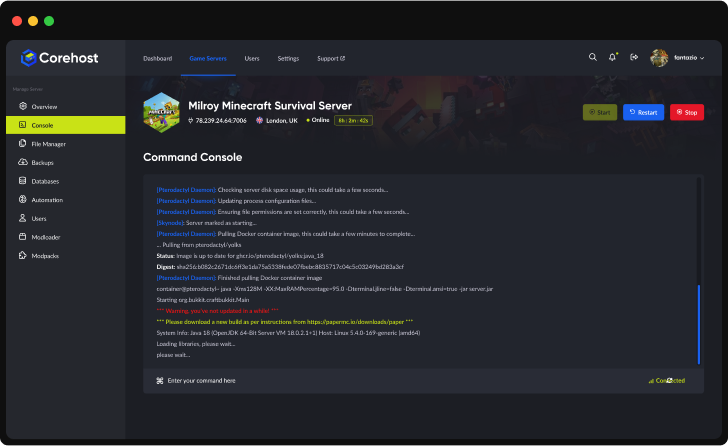
Console
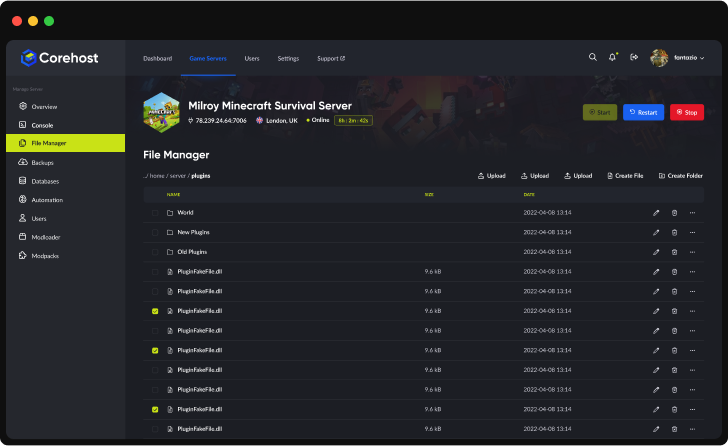
File Manager
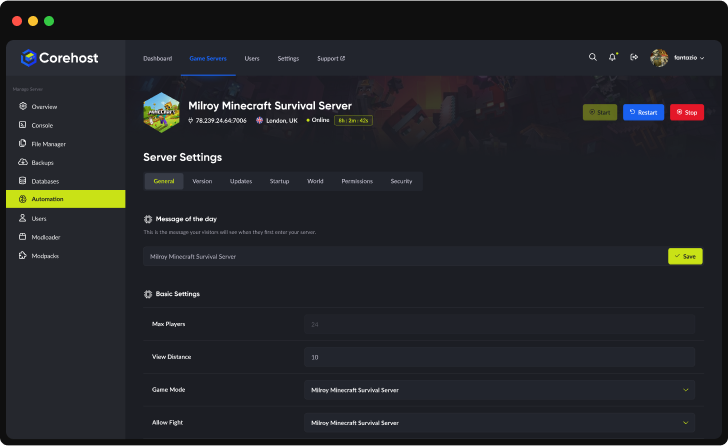
Settings
Plan Info
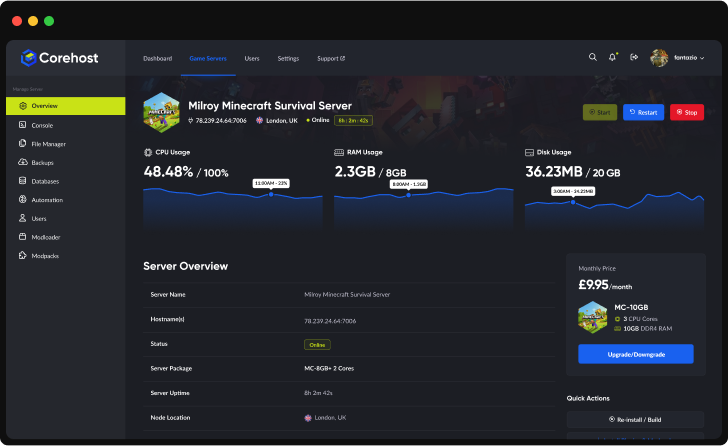
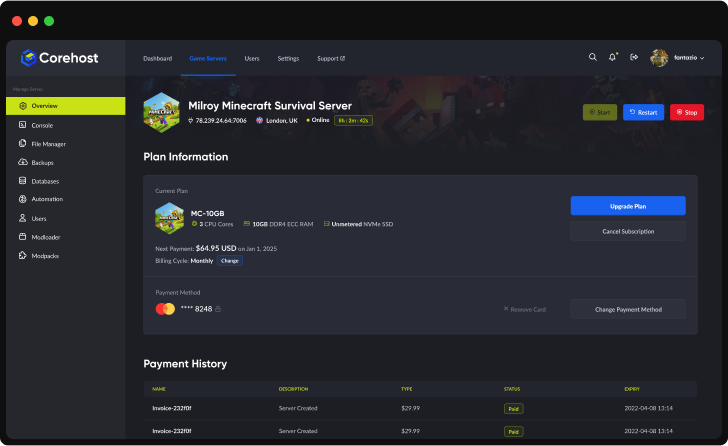
Powerful Dashboard
Monitor your server's vital statistics in real-time with our comprehensive dashboard. Track CPU, RAM, and disk usage through elegant visualisations, manage your server with one-click controls, and view all critical server information in a single, streamlined interface.
Server InfrastructureEnterprise-Grade Hardware

Premium CPUs
Performance-tuned
ECC Memory
High-performance
NVMe SSD
Ultra-fast storage
Premium Network
Low-latency routing'%3e%3cpath%20d='M-0.5%2074.875H254.5'%20stroke='%231961EF'%20stroke-width='21.25'%20stroke-miterlimit='10'/%3e%3cpath%20d='M-0.5%20128H254.5'%20stroke='%231961EF'%20stroke-width='21.25'%20stroke-miterlimit='10'/%3e%3cpath%20d='M-0.5%20181.125H254.5'%20stroke='%231961EF'%20stroke-width='21.25'%20stroke-miterlimit='10'/%3e%3cpath%20d='M73.875%20255.5V0.5'%20stroke='%231961EF'%20stroke-width='21.25'%20stroke-miterlimit='10'/%3e%3cpath%20d='M127%20255.5V0.5'%20stroke='%231961EF'%20stroke-width='21.25'%20stroke-miterlimit='10'/%3e%3cpath%20d='M180.125%20255.5V0.5'%20stroke='%231961EF'%20stroke-width='21.25'%20stroke-miterlimit='10'/%3e%3cpath%20d='M190.75%20234.25H63.25C46.7813%20217.781%2037.2187%20208.219%2020.75%20191.75V64.25C37.2187%2047.7813%2046.7813%2038.2187%2063.25%2021.75H190.75C207.219%2038.2187%20216.781%2047.7813%20233.25%2064.25V191.75C216.781%20208.219%20207.219%20217.781%20190.75%20234.25Z'%20fill='%232E303A'/%3e%3cpath%20d='M80.7812%20197.062L57.9375%20174.219V81.7812L80.7812%2058.9375H173.219L196.062%2081.7812V174.219L173.219%20197.062H80.7812Z'%20fill='%23C9E216'/%3e%3cpath%20d='M92.2%20180L75%20162.8V93.2L92.2%2076H161.8L179%2093.2V162.8L161.8%20180H92.2Z'%20fill='%23B5CB19'/%3e%3c/g%3e%3cdefs%3e%3cclipPath%20id='clip0_224_2316'%3e%3crect%20width='255'%20height='256'%20fill='white'/%3e%3c/clipPath%3e%3c/defs%3e%3c/svg%3e)
QuestionsV Rising server FAQ
How do my friends connect?
Players find your server by its Server name in V Rising's online server list, then join it, entering the join password if you set one. Keep List on Epic on in Settings: V Rising's server browser shows the Epic list by default. Your server uses two ports, both opened for you, so there's no port forwarding to set up.
Can PlayStation players join?
No. Our servers run the PC version of the V Rising dedicated server, and the PlayStation 5 version of V Rising plays on its own servers.
Which plan do I need?
The 6GB plan has 10 player slots, the 8GB plan 20 and the 12GB plan 40. In our tests with nobody online, a V Rising server used about 2.9GB of memory, and about 3.2GB with the BepInEx mod loader and one server mod. More players use more memory, and we haven't measured that yet. You can change plan from your control panel.
Why does my server show Starting for several minutes?
V Rising servers take a while to start. In our tests the first start after ordering took about 9 minutes, counting the download of the server files (about 2GB) and a new world, and later starts took 4 to 6 minutes. The server shows Starting until V Rising says it is ready, and you can follow it in the Console.
Does my world save when I stop or restart the server?
Yes. Stop and Restart ask V Rising to save the world and shut down. In our tests the save was written within 3 seconds and the server was offline within 45 seconds. V Rising also autosaves every 2 minutes by default (Autosave interval in Settings), and about three times less often while nobody is online and Lower FPS when empty is on, as it is by default. If V Rising doesn't shut down within 2 minutes, CoreHost stops it and the last autosave is kept. Kill ends the server at once without saving, so use Stop or Restart when you can.
How do I change PvP, sieges and other game rules?
Choose a Game mode in Settings. Each one is a complete set of game rules that comes with V Rising: Standard PvE turns off player versus player, and the PvP presets include Standard, Duo, Trio and Solo PvP, versions with daily, weekend or no sieges, Hardcore presets and Level presets. Difficulty (Easy, Normal or Brutal) is a separate setting. Both apply after a restart, to your current world too.
How do I start a new world, or go back to an old one?
In Settings, change World save name and restart the server. V Rising starts a new world in a folder with that name. Your old world stays in save-data/Saves, and changing the name back loads it again.
Can I add mods?
CoreHost doesn't offer mods on V Rising servers at the moment, and the AI Mod Assistant can't add them. V Rising server mods use the BepInEx mod loader and are shared on Thunderstore. BepInEx prepares its files the first time it starts, which in our tests worked on the 12GB plan and ran out of memory on the 6GB plan. If BepInEx fails to start, the server stops, starts again without mods and says why in the Console, so a mod problem can't keep your world offline.
What can I change in Settings?
Server name, join password, server description, game mode, difficulty, world save name, how often the world autosaves and how many autosaves to keep, listing on Epic and Steam, Update on start and Lower FPS when empty. CoreHost passes them to V Rising each time the server starts, so changes apply after a restart. Player slots are set by your plan.
How much does a V Rising server cost?
$6 a month for 6GB (up to 10 players), $8 for 8GB (up to 20 players) or $12 for 12GB (up to 40 players). Prices are in Australian dollars and billed monthly.
More answers in our FAQ, and every plan for every game on the pricing page.
Deploy your game server today
Your server is set up automatically as soon as you order, with no waiting on a person.