
Factorio
Server Hosting in Australia
Starting from $2/mo. Configure your plan below.
Choose Your Plan
Factorio Game Type

Factorio
Build and automate a factory with up to 32 players on a Factorio server, with or without the Space Age expansion. It stays online when you log off, and it's hosted in Sydney for low ping across AU and NZ.
Choose Your Plan
All prices are in Australian dollars (AUD).Select a plan to view price
Server Specs
- Performance-tuned processors
- Unlimited NVMe SSD storage
- Enterprise DDoS Protection
Network
- Premium Sydney bandwidth
- Low-latency routing
Game Server FeaturesWhat's included with my server?

Blazing Fast Servers

Full File Manager

Instant Setup

Automated Backups

Fast Support

DDoS Protection

Scale Up or Down

72 Hour Refunds
Our Control PanelMeet CorePanel
Discover powerful features to manage your game server!
Dashboard
Console
File Manager
Settings
Plan Info
Powerful Dashboard
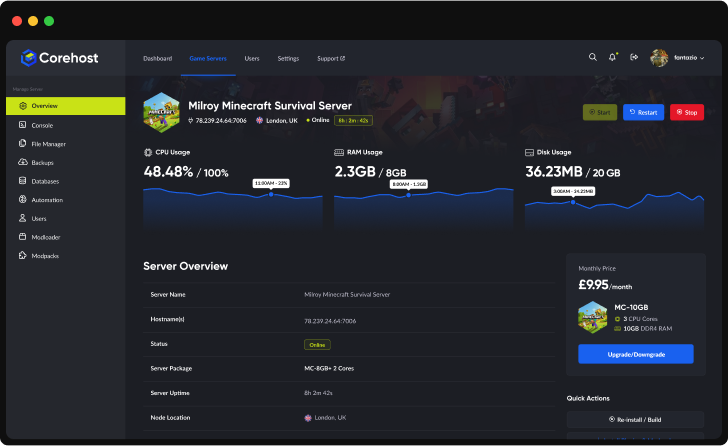
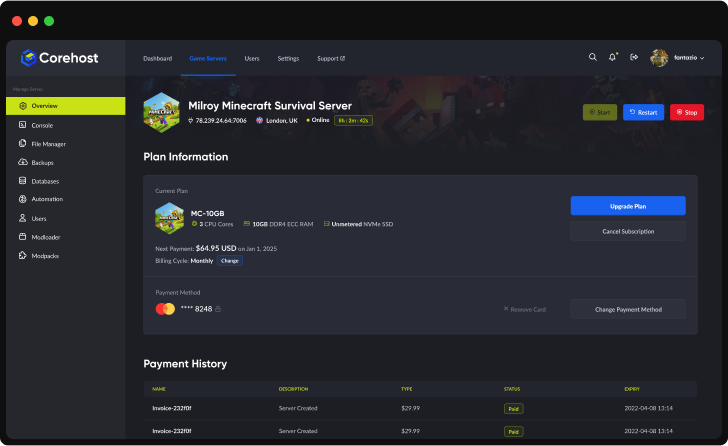
Monitor your server's vital statistics in real-time with our comprehensive dashboard. Track CPU, RAM, and disk usage through elegant visualisations, manage your server with one-click controls, and view all critical server information in a single, streamlined interface.
Server InfrastructureEnterprise-Grade Hardware

Premium CPUs
Performance-tuned
ECC Memory
High-performance
NVMe SSD
Ultra-fast storage
Premium Network
Low-latency routing'%3e%3cpath%20d='M-0.5%2074.875H254.5'%20stroke='%231961EF'%20stroke-width='21.25'%20stroke-miterlimit='10'/%3e%3cpath%20d='M-0.5%20128H254.5'%20stroke='%231961EF'%20stroke-width='21.25'%20stroke-miterlimit='10'/%3e%3cpath%20d='M-0.5%20181.125H254.5'%20stroke='%231961EF'%20stroke-width='21.25'%20stroke-miterlimit='10'/%3e%3cpath%20d='M73.875%20255.5V0.5'%20stroke='%231961EF'%20stroke-width='21.25'%20stroke-miterlimit='10'/%3e%3cpath%20d='M127%20255.5V0.5'%20stroke='%231961EF'%20stroke-width='21.25'%20stroke-miterlimit='10'/%3e%3cpath%20d='M180.125%20255.5V0.5'%20stroke='%231961EF'%20stroke-width='21.25'%20stroke-miterlimit='10'/%3e%3cpath%20d='M190.75%20234.25H63.25C46.7813%20217.781%2037.2187%20208.219%2020.75%20191.75V64.25C37.2187%2047.7813%2046.7813%2038.2187%2063.25%2021.75H190.75C207.219%2038.2187%20216.781%2047.7813%20233.25%2064.25V191.75C216.781%20208.219%20207.219%20217.781%20190.75%20234.25Z'%20fill='%232E303A'/%3e%3cpath%20d='M80.7812%20197.062L57.9375%20174.219V81.7812L80.7812%2058.9375H173.219L196.062%2081.7812V174.219L173.219%20197.062H80.7812Z'%20fill='%23C9E216'/%3e%3cpath%20d='M92.2%20180L75%20162.8V93.2L92.2%2076H161.8L179%2093.2V162.8L161.8%20180H92.2Z'%20fill='%23B5CB19'/%3e%3c/g%3e%3cdefs%3e%3cclipPath%20id='clip0_224_2316'%3e%3crect%20width='255'%20height='256'%20fill='white'/%3e%3c/clipPath%3e%3c/defs%3e%3c/svg%3e)
QuestionsFactorio server FAQ
How do my friends connect?
Share the IP address and port from your server's Overview page. In Factorio, choose Multiplayer, then Connect to address, and enter the address as IP:port. If you set a Join password in Settings, they need that too. Everyone needs the same Factorio version as the server, and the Space Age expansion if your world uses Space Age. There's no port forwarding to set up.
Which version of Factorio does my server run?
The newest stable release from factorio.com. With Update on start turned on (the default), the server checks for a new release every time it starts and updates to it. Players need exactly the same version as the server, so if they can't join after a Factorio update, restart the server. Before the version changes, the server copies your newest save to the saves-before-update folder. A world saved by a newer version can't be opened by an older one, so the server never moves back to an older version. If your server has mods, a new major version (for example 2.0 to 2.1) waits until you use Reinstall server on the Settings page, because mods often need their own update first. Reinstall keeps your saves, mods and settings.
Can I run the experimental version?
Yes. In Settings, open Advanced, set Update channel to Experimental, then restart the server. It updates to Factorio's newest experimental release, and your players must switch their own game to the same version to join. Make a backup first: a world saved by the experimental version can't be opened by an older stable version, so if you switch back to Stable, the server stays on the experimental version until the stable release catches up.
Do my players need Space Age?
Only for a Space Age world. You choose Space Age when you order, and it also turns on Quality and Elevated Rails. On a Space Age world every player needs the Space Age expansion to join. With Space Age off, the world is the base game. The choice is fixed when your world is created: an existing world keeps the expansions it was made with, so changing it means starting a new world.
Which plan do I need?
The 2GB plan has 8 player slots, the 4GB plan 16 and the 6GB plan 32. Factorio's memory use grows with the size of your factory and how much of the map has been explored, not with the number of players. In our tests with nobody online and no factory built, a new Space Age world used about 0.4GB, and so did a map explored across all five Space Age planets. A much larger explored map used about 0.9GB, and generating that much map at once peaked at about 1.25GB, so our plans start at 2GB. Buildings add memory too, so large factories and Space Age bases may need the 4GB or 6GB plan. You can change plan from your control panel.
Does my world save when I stop or restart the server?
Yes. Stop and Restart send Factorio's /quit command, which saves the world and then shuts the server down. In our tests that took under 6 seconds, even for a large map. The server also autosaves every 10 minutes by default. Kill ends the server at once without saving, and the next start loads the newest autosave, so anything since that autosave is lost. If the server runs out of memory, it restarts and loads the newest autosave the same way. Use Stop or Restart when you can.
Does my factory keep running when nobody is online?
Not by default. Pause when empty is on for new servers, so the game pauses while nobody is online. To keep your factory running while everyone is away, turn it off in Settings and restart the server.
How do I play a save from my own game?
Stop the server, upload the save's .zip file into the saves folder in the File Manager, then start the server: it loads the newest save in that folder. Upload while the server is stopped. If you upload while it runs and then press Restart, the server saves the running world first, which makes that the newest save again. The server turns Space Age, Quality and Elevated Rails on or off to match your save. Your save must come from the same or an older Factorio version than the server's. To take your world home, download it from the saves folder (a new server's world is saves/world.zip).
How do I start a new world, or change the map settings?
Space Age, map preset, map seed and peaceful mode are only used when the server creates a new world. To start one, make a backup, set these under New world in Settings, stop the server, delete the files in the saves folder, then start the server. It creates the new world with those settings, which took about 8 seconds in our tests. While a world exists it keeps its own settings, and the Console says so if your Settings differ.
What can I change in Settings?
Server name, description, join password, pausing when empty, who can pause, AFK kick, how often the game autosaves and how many autosaves are kept, update on start, admins, the whitelist, public listing with your factorio.com username and token, the new world options and, under Advanced, the update channel. CoreHost writes these into the server's settings files each time it starts, so changes apply after a restart, and editing the same values in the files is undone at the next start. Player slots are set by your plan.
How do I add admins or use a whitelist?
In Settings, enter factorio.com usernames separated by commas under Admins or Whitelisted players, turn Whitelist on to let only those players join, then restart the server. A list set in Settings replaces the server's list at every start. Leave a list empty and the server keeps the list it has. With Whitelist on and no names, nobody can join.
Can my server appear in Factorio's public server list?
Factorio only lists servers that use a factorio.com account. To ask it to list yours, turn on Public listing in Settings and add your factorio.com username and token (the token from your profile on factorio.com, not your password), then restart. Without them the server is not listed, the Console says why, and players join by address. If the username or token is wrong, the server keeps running but is not listed, and the Console shows Matching server connection failed.
Can I install mods?
Yes, by uploading them yourself. The AI Mod Assistant can't install Factorio mods, because the Factorio mod portal only lets a signed-in factorio.com account download them. Download the mods from mods.factorio.com, make a backup, stop the server, upload the .zip files to the mods folder in the File Manager, then start it. The Console shows a Loading mod line for each mod that loads. If a mod can't load, for example because it needs another mod or was made for another Factorio version, the server doesn't start and the Console names the mod and the reason: remove that .zip and start again. Every player needs the same mods as the server. Removing a mod also removes its items and buildings from your world, so back up before every change.
What's in my backups?
Your saves, mods and settings files. The game files are left out to keep backups small, so after you restore a backup with delete all files ticked, the next start downloads the same Factorio version again. That start took about 45 seconds in our tests instead of about 25.
Can Nintendo Switch players join?
We haven't tested the Nintendo Switch version of Factorio with our servers, so we can't promise that Switch players can join.
How much does a Factorio server cost?
$2 a month for 2GB (up to 8 players), $4 for 4GB (up to 16 players) or $6 for 6GB (up to 32 players). Prices are in Australian dollars and billed monthly.
More answers in our FAQ, and every plan for every game on the pricing page.
Deploy your game server today
Your server is set up automatically as soon as you order, with no waiting on a person.