
RuneScape: Dragonwilds
Server Hosting in Australia
Starting from $4/mo. Configure your plan below.
Choose Your Plan
RuneScape: Dragonwilds Game Type

RuneScape: Dragonwilds
Gather, build and battle dragons across Ashenfall with up to 6 players. Your RuneScape: Dragonwilds server stays online when you log off, and it's hosted in Sydney for low ping across AU and NZ.
Choose Your Plan
All prices are in Australian dollars (AUD).Select a plan to view price
Server Specs
- Performance-tuned processors
- Unlimited NVMe SSD storage
- Enterprise DDoS Protection
Network
- Premium Sydney bandwidth
- Low-latency routing
Game Server FeaturesWhat's included with my server?

Blazing Fast Servers

Full File Manager

Instant Setup

Automated Backups

Fast Support

DDoS Protection

Scale Up or Down

72 Hour Refunds
Our Control PanelMeet CorePanel
Discover powerful features to manage your game server!
Dashboard
Console
File Manager
Settings
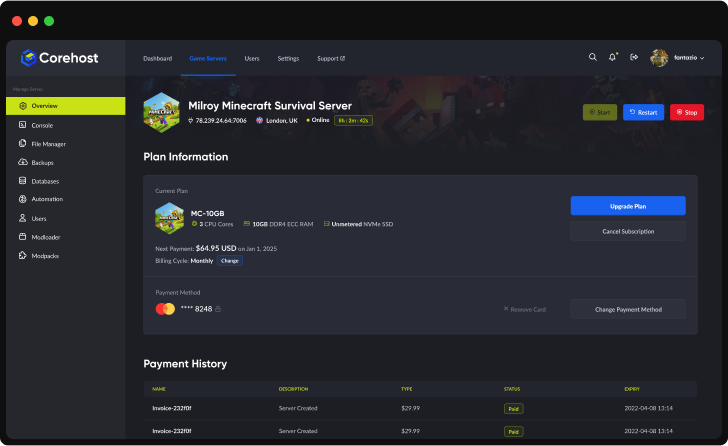
Plan Info
Powerful Dashboard
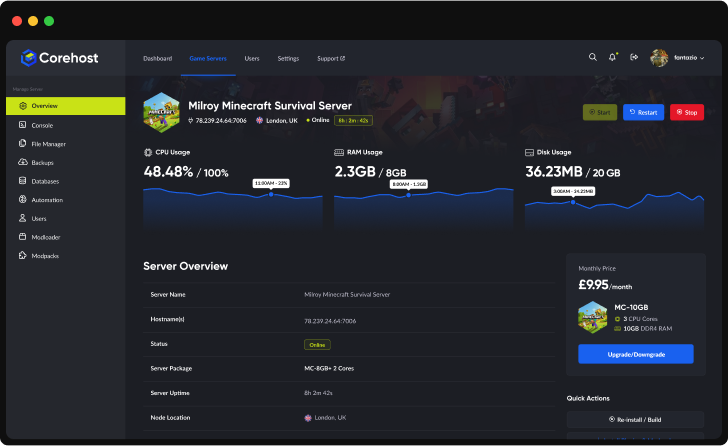
Monitor your server's vital statistics in real-time with our comprehensive dashboard. Track CPU, RAM, and disk usage through elegant visualisations, manage your server with one-click controls, and view all critical server information in a single, streamlined interface.
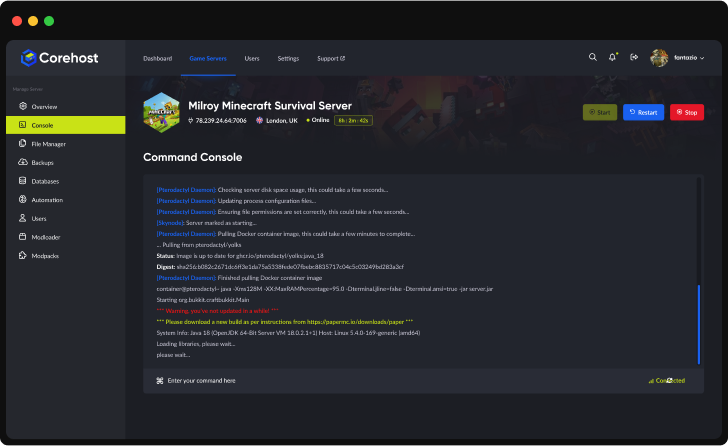
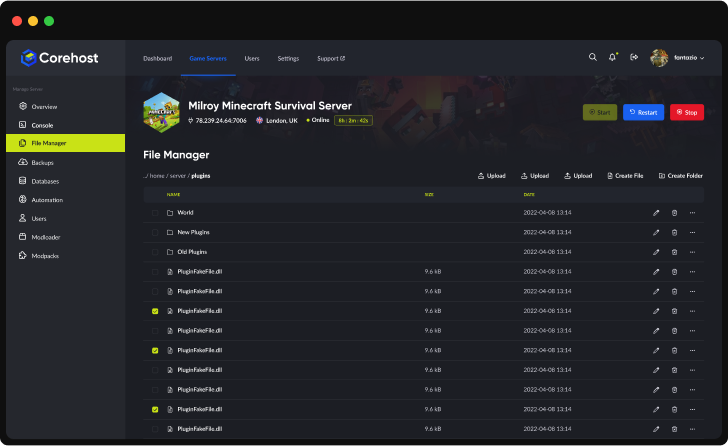
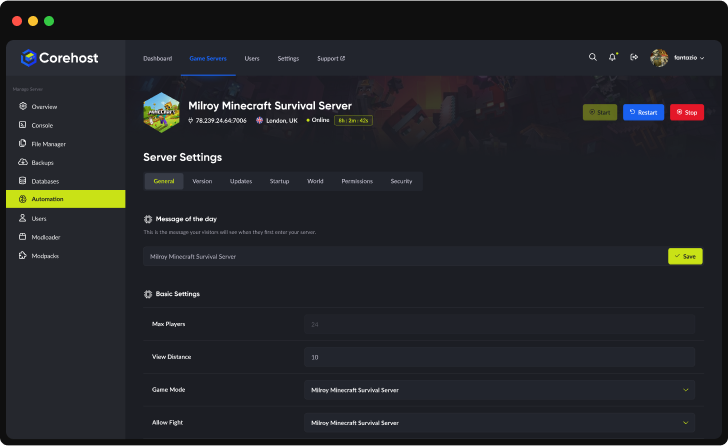
Server InfrastructureEnterprise-Grade Hardware

Premium CPUs
Performance-tuned
ECC Memory
High-performance
NVMe SSD
Ultra-fast storage
Premium Network
Low-latency routing'%3e%3cpath%20d='M-0.5%2074.875H254.5'%20stroke='%231961EF'%20stroke-width='21.25'%20stroke-miterlimit='10'/%3e%3cpath%20d='M-0.5%20128H254.5'%20stroke='%231961EF'%20stroke-width='21.25'%20stroke-miterlimit='10'/%3e%3cpath%20d='M-0.5%20181.125H254.5'%20stroke='%231961EF'%20stroke-width='21.25'%20stroke-miterlimit='10'/%3e%3cpath%20d='M73.875%20255.5V0.5'%20stroke='%231961EF'%20stroke-width='21.25'%20stroke-miterlimit='10'/%3e%3cpath%20d='M127%20255.5V0.5'%20stroke='%231961EF'%20stroke-width='21.25'%20stroke-miterlimit='10'/%3e%3cpath%20d='M180.125%20255.5V0.5'%20stroke='%231961EF'%20stroke-width='21.25'%20stroke-miterlimit='10'/%3e%3cpath%20d='M190.75%20234.25H63.25C46.7813%20217.781%2037.2187%20208.219%2020.75%20191.75V64.25C37.2187%2047.7813%2046.7813%2038.2187%2063.25%2021.75H190.75C207.219%2038.2187%20216.781%2047.7813%20233.25%2064.25V191.75C216.781%20208.219%20207.219%20217.781%20190.75%20234.25Z'%20fill='%232E303A'/%3e%3cpath%20d='M80.7812%20197.062L57.9375%20174.219V81.7812L80.7812%2058.9375H173.219L196.062%2081.7812V174.219L173.219%20197.062H80.7812Z'%20fill='%23C9E216'/%3e%3cpath%20d='M92.2%20180L75%20162.8V93.2L92.2%2076H161.8L179%2093.2V162.8L161.8%20180H92.2Z'%20fill='%23B5CB19'/%3e%3c/g%3e%3cdefs%3e%3cclipPath%20id='clip0_224_2316'%3e%3crect%20width='255'%20height='256'%20fill='white'/%3e%3c/clipPath%3e%3c/defs%3e%3c/svg%3e)
QuestionsRuneScape: Dragonwilds server FAQ
How many players can my RuneScape: Dragonwilds server hold?
A Dragonwilds dedicated server holds up to 6 players. Our plans follow Jagex's guide of 2GB plus 1GB per player: 4GB for up to 2 players, 6GB for up to 4 and 8GB for up to 6. Your plan sets the player limit, and you can change plan from your control panel.
Can PlayStation 5, Xbox and Switch 2 players join?
Yes. Dragonwilds supports crossplay, and new servers start with Who can join set to Crossplay, so PC, PlayStation 5, Xbox and Switch 2 players can share one world. To let only one platform join, change Who can join in Settings in CorePanel, then restart the server.
What is the Owner Player ID and where do I find it?
The Owner Player ID is your Dragonwilds Player ID, a 32-character code at the bottom of the in-game Settings menu, which has a button to copy it. The server needs it to start, and the player with that ID can ban and unban anyone. The server can't check the ID for typos, so copy it exactly. You can change it later in Settings in CorePanel.
How do my friends find my server?
In game, open the Worlds screen, go to the Public tab and search for your world name. The search is case-sensitive, so it has to match exactly. If you set a world password, they need that too.
What does the Admin Password do?
Players who enter the Admin Password in Pause, Settings, Server Management become admins and can ban players who are online. Keep it private, and change it in Settings in CorePanel if it gets shared.
Does my world save when I stop or restart the server?
Yes. Dragonwilds saves your world every minute while the server is running. When you stop or restart the server, CoreHost waits for the next save before it shuts down, so stopping or restarting can take up to about a minute. Kill does not wait for a save, so use Stop or Restart when you can.
Can I install mods?
Not at the moment. RuneScape: Dragonwilds has no official mod support. Community mods are .pak files shared on Nexus Mods, and PlayStation 5, Xbox and Switch 2 players can't use mods, so the AI Mod Assistant isn't available for this game. Crossplay, passwords and the world name are on your server's Settings page.
How much does a RuneScape: Dragonwilds server cost?
Plans start at $4 a month for 4GB (up to 2 players), then $6 for 6GB (up to 4 players) and $8 for 8GB (up to 6 players). Prices are in Australian dollars and billed monthly.
More answers in our FAQ, and every plan for every game on the pricing page.
Deploy your game server today
Your server is set up automatically as soon as you order, with no waiting on a person.